Introducing the Form 16 Analyser: Free, Private, No Signup
Drop your Form 16 PDF in. Get the full Part A + Part B read, both regimes compared, and missed deductions in about 10 seconds. No account, no email, no long-term storage.
Most tools that read your Form 16 want something in return: an account, a phone number, a copy of your tax data sitting on their server. We built one that takes none of that.
The Form 16 Analyser is now live at itrstats.in/form16-analyser. Drop your PDF in, and you get a complete tax breakdown - Part A walkthrough, Part B salary-to-tax flow, old vs new regime comparison, and the deductions your employer didn't apply. Free, no signup, your file is auto-deleted within seconds.
Try it now
Upload your Form 16 PDF (password-protected ones supported). Free. No account, no email gate, no third-party storage.
Open Form 16 AnalyserWhat You Get
After you upload, the Analyser produces a single-page report with seven sections. The three that matter most for tax decisions:
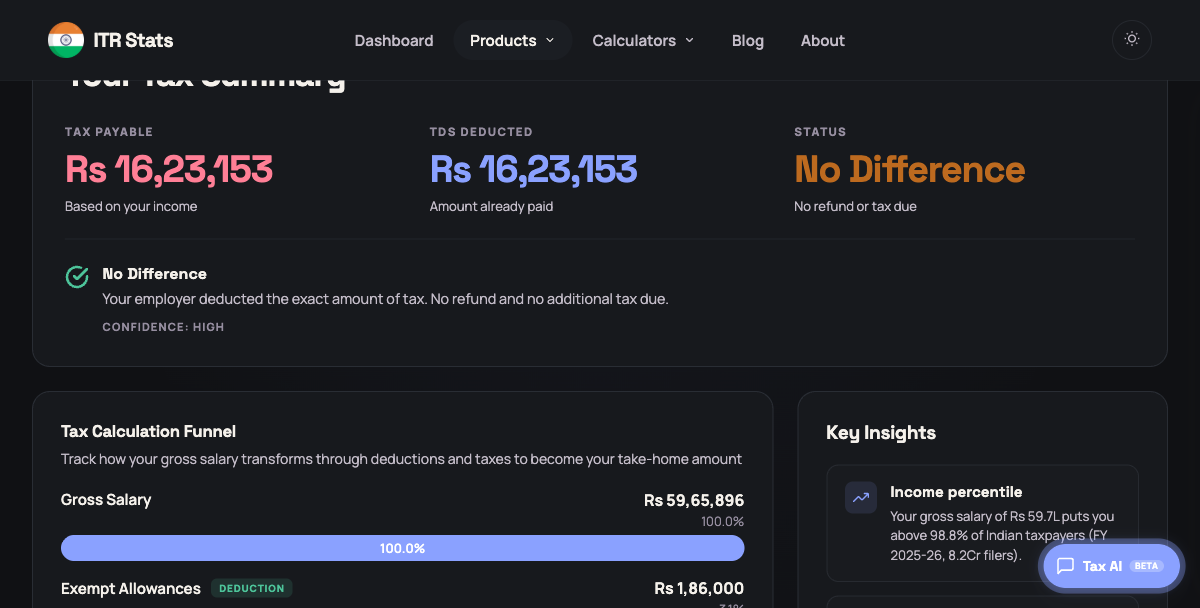
1. Tax Summary
The verdict at the top. Did your employer deduct the right amount? Are you owed a refund, will you owe more at filing, or is it exact?
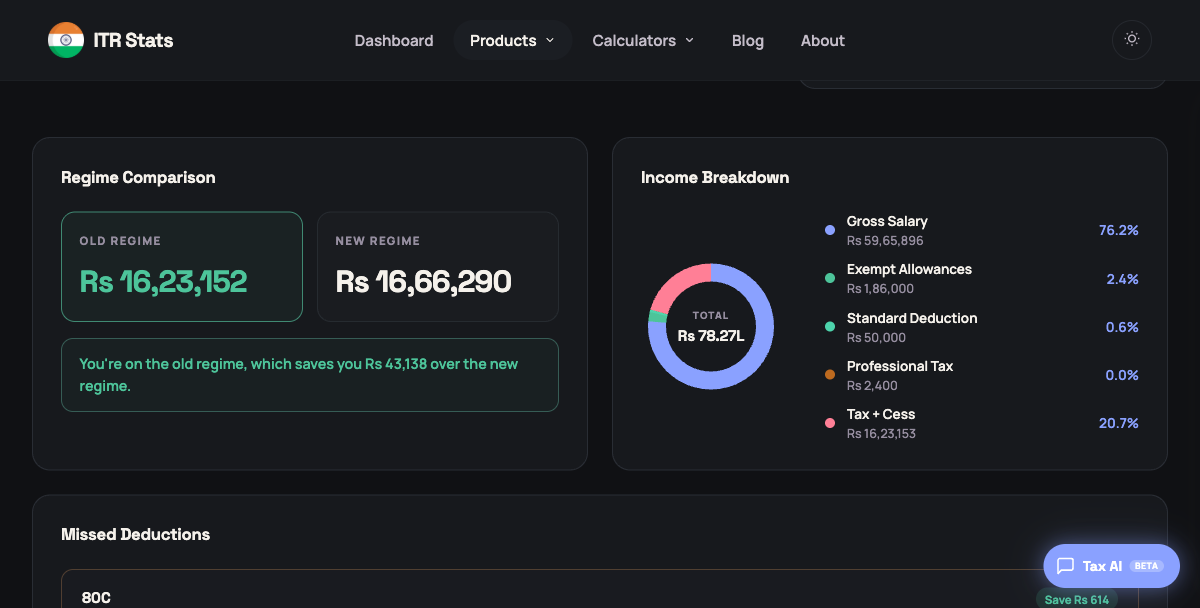
2. Regime Comparison + Income Breakdown
The killer feature. The Analyser computes your tax under both the old and new regime - using your actual Form 16 numbers - and tells you which one saves you more, in rupees. The donut chart on the right shows where every rupee of your gross salary goes: exempt allowances, deductions, and tax + cess.
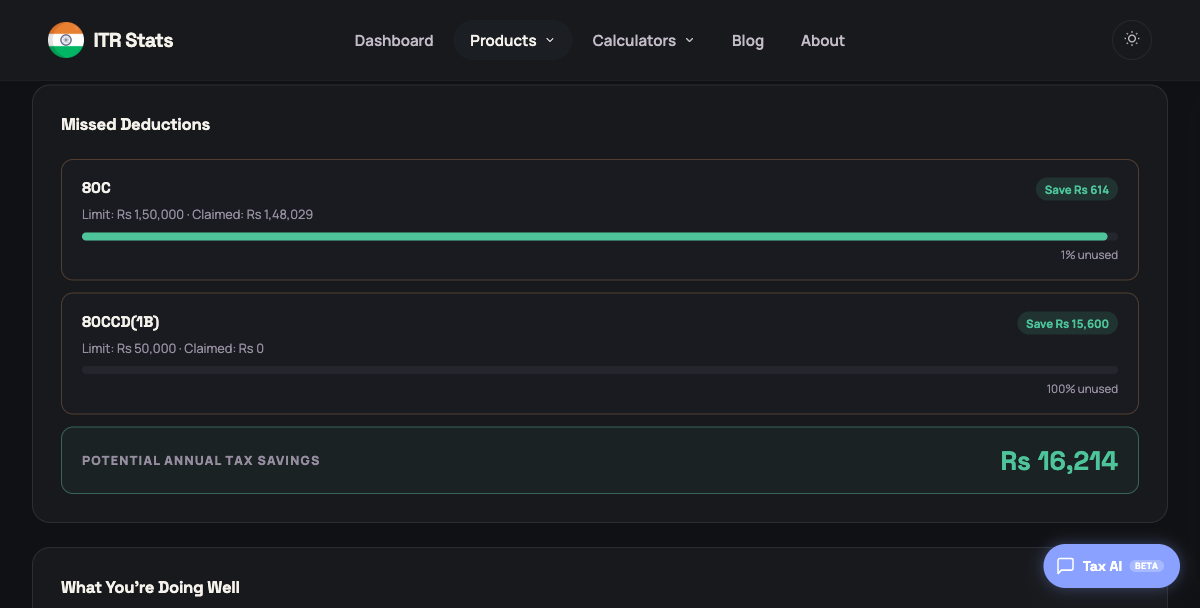
3. Missed Deductions
This is the section most people don't expect. The Analyser cross-checks your Form 16 against the deductions your regime allows, and surfaces the unused capacity - with the rupee tax you'd save by claiming each one. If you didn't max your 80C, didn't put anything into 80CCD(1B), or skipped 80D, this is where it shows up.
The full report also includes a tax calculation funnel (gross salary → exemptions → deductions → tax), key insights (effective tax rate, monthly take-home, income percentile against ITR filers), and a "what you're doing well" panel that calls out the deductions you did claim properly.
Want to read your Form 16 manually? Section-by-section guideWhat Stays Private (and What Doesn't)
The honest version. We could say "100% private, never touched, never seen by anyone" - every other Form 16 tool does. But that's almost certainly false the moment any AI is involved in parsing. Here's what we actually do:
- YES Your file is auto-deleted within seconds. The PDF is briefly written to a transient temp file on our server because the parser (
pdftotext) needs a file path to read from. The file is deleted before the response is even sent back to your browser. - YES No database, no cache, no backup. There is no DB driver imported anywhere in the analyser code. Nothing about your file or its contents persists beyond the request.
- YES Logs capture only request metadata. Method, path, status, latency, and a request ID. We do not log your filename, your file contents, your PAN, your salary, or any extracted field. Aggregate counters (page count, character count) are logged for debugging.
- YES Passwords stay local. If your PDF is password-protected, the password is used only on our server for local decryption. It is never logged and never sent to OpenAI.
- YES Your PAN and TAN are stripped before any third-party call. Personal tax identifiers are removed from the parsed text on our server before we send anything to OpenAI for structured-field extraction. Only the redacted text goes - never the PDF file itself.
That's the full list. There are no other third parties. No AWS Textract, no Google Document AI, no analytics on your file's content, no fingerprinting, no IP-keyed storage. The 10 MB upload limit and 60-second timeout bound the request lifetime.
How to Use It
- Open itrstats.in/form16-analyser
- Drop your Form 16 PDF onto the upload area, or click to browse. If your PDF is password-protected, enter the password (most employer-issued Form 16s use your PAN in lowercase plus your date of birth in DDMMYYYY format).
- Click Analyse Form 16. The four-step loader (reading PDF, extracting salary components, calculating tax, finding missed deductions) takes about 10 seconds.
- Read the report. Use the regime comparison to decide your filing regime. Use the missed deductions to figure out what to claim before you file.
Why We Built It This Way
Two decisions were upstream of everything else.
No signup, ever. Tax data is sensitive enough that asking for an email address to "unlock" a free tool is a tracking decision, even if you promise not to share it. The cleanest way to not collect data is to not ask for it.
Be specific about privacy. "100% private" is a marketing line. "Your file is auto-deleted within seconds, never logged, and your PAN and TAN are stripped on our server before we call OpenAI for parsing" is a verifiable claim. We'd rather print the second one and have it match the code than print the first one and slowly lose your trust.
We'll keep iterating on the regime logic, the missed-deductions surfacing, and the report layout over the coming weeks. If something looks off in your report - or you have ideas for what should go where - DM us on X or just reply to the next ITR Stats email.
Frequently Asked Questions
Yes. No signup, no email, no payment. Drop your Form 16 PDF in and the report appears in about 10 seconds. We keep iterating on the regime logic and missed-deductions surfacing, but it stays free.
Not long-term. The PDF is briefly written to a transient temp file on our server because the parsing tool needs a file path to read from. The file is deleted within seconds of the response being sent. There is no database, no S3 bucket, no backup, and no caching.
We use OpenAI to extract structured fields from your Form 16. Before the call, we strip personal identifiers like PAN and TAN from the parsed text on our server. Only the redacted text goes to OpenAI - the PDF file itself never leaves our server.
Yes. Enter the password before clicking Analyse. The password is used only on our server to decrypt the PDF locally - it is never logged, never stored, and never sent to OpenAI. It goes out of memory the moment the request finishes.
FY 2025-26 (AY 2026-27). The slabs, Section 87A rebate threshold, and standard deduction values target FY 2025-26. Older Form 16s may still parse, but the regime comparison and tax computation will use FY 2025-26 rules - so the verdict is most reliable for current-year filings.
Not yet. The Analyser is a read-only insight tool - it shows you what your Form 16 contains, where you stand on regime choice, and which deductions you missed. To actually file your ITR, log in to incometax.gov.in. We may add filing assistance later, but right now the goal is to make sure you walk into filing with a clear picture of your numbers.